CarHome Ultra Unlocker
TheSpinningHeadAuto & Vehicles
4.0423.00 Reviews
- Version
- 1.7
- Installs
- 50.00K
- Age Rating
- Everyone
Screenshots
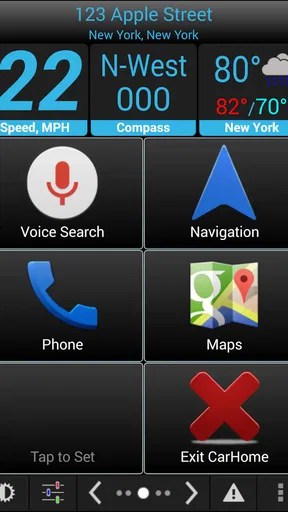
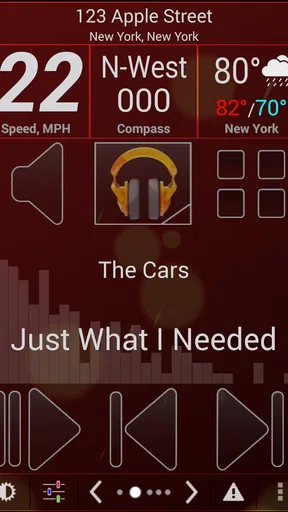
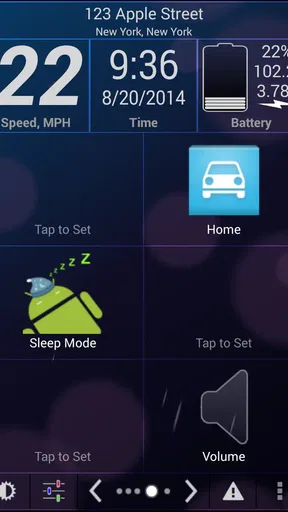
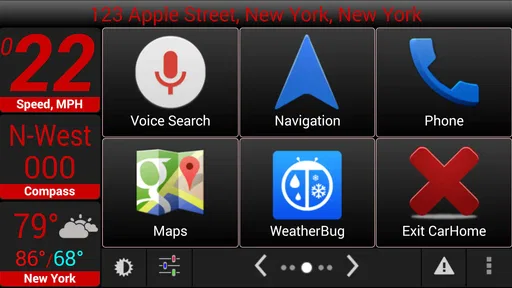
Our Review of CarHome Ultra Unlocker
 Analysis by Appyee
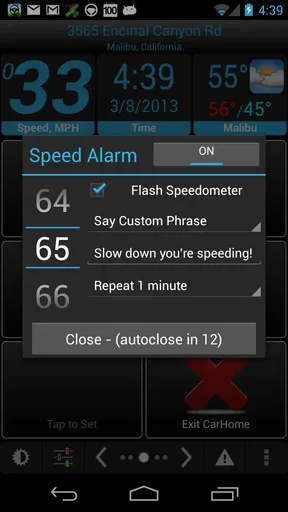
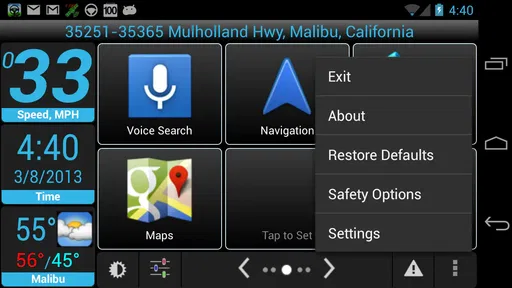
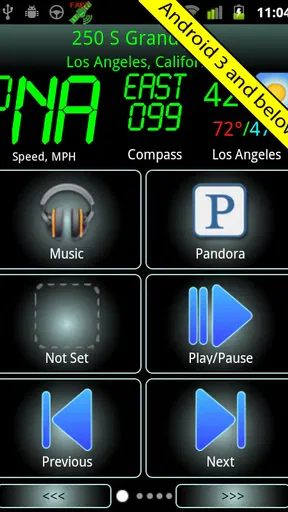
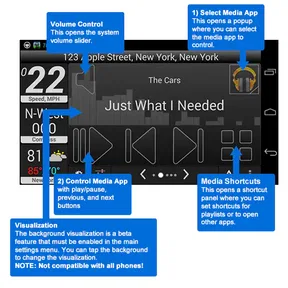
When I look at CarHome Ultra Unlocker, I see a very specific kind of Android tool: it is meant to make a phone more manageable from the driver’s seat. Instead of treating the handset like a small computer that demands attention, it presents the idea of a car-focused home screen for music and phone controls. I tested it with that practical question in mind: does it make a phone less distracting and more useful while parked in a dashboard mount?
My short answer is that it can be worthwhile for drivers who still use an older Android phone as a dedicated in-car device, especially if they prefer large, direct controls over a normal launcher. It is not a universal replacement for every modern driving interface, though. The experience depends heavily on how well the phone, audio system, navigation apps, and mobile connection work together. That makes this a focused utility rather than an app I would recommend to everyone.
What the unlocker changes in a real car setup
The first thing to understand is the role of the product. The store summary describes a car dock app for listening to music and managing a phone, while the short description identifies this purchase as the CarHome Ultra Unlocker. In practical terms, I would think of it as the key that enables the full car-oriented experience rather than as a music service or a navigation platform by itself.
That distinction matters. The app does not become useful because it replaces every other app on the phone. It becomes useful because it gives driving tasks a more deliberate place. When I am sitting in a parked car, a regular Android launcher can feel cluttered with small icons, notifications, and unrelated shortcuts. A car dock approach is better suited to quick glances and simple taps, provided the phone is mounted securely and positioned where it can be seen without blocking the road.
I also appreciate that the developer, TheSpinningHead, has kept the concept narrow. A focused car interface is easier to understand than a dashboard filled with features I never use. The trade-off is that the app feels tied to the habits of people who want to control an existing Android phone from a vehicle. If your car already has a polished built-in system and you rarely use the phone directly, the unlocker may add little.
The app belongs in the Auto & Vehicles category, and that description fits better than a general productivity label. I would not install it expecting a new streaming catalog, a replacement for a car stereo, or a complete navigation service. Its value comes from organizing the phone around driving-related actions. That is a more modest promise, but it is also the reason the app can feel helpful when the setup matches its purpose.
Where connectivity becomes part of the experience
Connectivity affects this app in several different ways, and it is important not to confuse the interface with the services it opens. If I use the phone to reach music, mapping, traffic information, or communication tools, those destinations may depend on the phone’s network connection and on the behavior of the individual services. The dock can make access more convenient, but it cannot guarantee that a weak signal will become a strong one.
This becomes obvious on a long drive through areas with inconsistent coverage. A car-focused screen may still be useful for reaching functions already available on the device, but online music catalogs, live traffic, account checks, and other connected tasks can behave differently when the signal fades. I would prepare important routes and playlists before leaving rather than assume that a dashboard interface solves every network problem.
There is also a practical difference between a phone connected to the car for audio and a phone using mobile data for online content. Bluetooth or another audio connection can keep sound moving to the vehicle while the phone’s internet connection handles a separate job. If audio stops, I would check the car connection and the selected playback app before blaming the dock. If a map fails to update, I would look at signal strength and the map service itself.
That separation is one of the less obvious lessons from using a car launcher. The app can reduce the number of steps needed to reach a function, but it does not remove the chain of dependencies behind that function. A smooth experience requires the phone mount, audio route, selected app, and network to cooperate. When they do, the interface feels efficient. When one link fails, diagnosis takes a little patience.
Everyday mobile situations where it makes sense
The strongest use case for me is a phone mounted in an older vehicle that lacks a modern dashboard interface. Imagine leaving work with the handset already in its cradle. I want to start a familiar music app, check a route, or manage a call without searching through a standard home screen. A car-specific layout can make that transition feel more natural than swiping through ordinary phone pages.
It can also suit someone who keeps a spare Android device in the car. A dedicated phone does not need to compete with the handset used for work, messages, and personal notifications. The car device can be arranged around music, navigation, and basic phone management. That separation may be more comfortable for drivers who want fewer distractions from unrelated apps.
Another useful situation is the short trip. On a quick school run or grocery trip, I do not want to spend time rearranging the phone each time I enter the car. A consistent car home screen can make the routine predictable: mount the device, connect the audio, and use the same broad controls. Predictability is more valuable here than having dozens of options.
However, I would not treat the app as permission to operate the phone while moving. Large controls can reduce friction, but they do not make typing, browsing, or reading safe during a drive. I would set the route, choose the audio, and adjust the layout while parked. Once moving, the best experience is one that requires as little interaction as possible.
The mobile context also reveals a limitation: a phone screen is still a phone screen. A well-designed car interface can be easier to glance at, but it cannot provide the same physical integration as controls built into the steering wheel or a factory display. Drivers who already have those controls may find the app less compelling than people with a basic dashboard.
What happens when the setup fails
My preferred way to use any car utility is to test it before relying on it for an important journey. I would place the phone in its usual mount, connect the car audio, open the dock, and try the actions I actually use. That simple rehearsal exposes problems such as an awkward mount angle, an audio source switching unexpectedly, or a shortcut leading to an app that is not ready for use.
If music does not play, I would work through the problem in layers. First, I would check whether the car is receiving audio from the phone. Next, I would check whether the chosen music app is open and ready. Then I would confirm that the phone is not sending sound somewhere else. This approach is more effective than repeatedly tapping the same dashboard control, because the dock may be working while the audio connection is not.
Navigation failures deserve a similar approach. If the route does not load, I would verify the network connection and the mapping app. If the map is visible but the phone is difficult to read, I would adjust the mount before driving. A dashboard tool should make the phone easier to use, not force me to lean forward or take my eyes off the road.
There is a useful recovery habit that generic app descriptions rarely mention: keep a simple fallback ready. That might mean knowing the physical controls on the car stereo, remembering the route’s main roads, or having a second way to stop audio. I would never make a single phone interface the only thing standing between me and basic control of the vehicle’s entertainment system.
Older Android compatibility is another part of the story. The listed minimum operating system is Android 1.6, which signals that the app was designed with a much earlier generation of phones in mind. That can be attractive if you are repurposing an old device, but it also means I would judge the experience by the actual phone rather than by the minimum requirement alone. An old handset may have slower startup, a tired battery, or limited performance even if the app itself installs.
The current version is 1.7, so I would approach it as an established, focused utility rather than a fast-changing platform. That is not automatically negative. A stable tool can be preferable in a car, where consistency matters. Still, people who expect frequent modern integrations or an interface designed around the newest Android conventions may find the product dated.
Using it without wasting mobile data
For a data-conscious driver, the important point is to separate the dashboard from the online content being controlled. The car interface may help me reach music or navigation, but streaming and live information can still consume mobile data. I would choose downloaded music where possible, review the settings of the services I use, and avoid treating every trip as a reason to stream high-quality media continuously.
This is especially relevant when the phone is also used as a hotspot or when the monthly plan is limited. A convenient car screen can make it easy to start a long playlist and forget that the phone is using cellular data for the entire journey. I would prepare a small travel playlist and check route requirements before leaving, particularly for drives through areas where the connection may be unreliable.
Battery use deserves the same attention. A mounted phone with its screen active, audio connected, and navigation running can place more demand on the battery than ordinary pocket use. I would keep a reliable charging arrangement in the car, but I would also avoid leaving the phone running unnecessarily after parking. The app may organize the dashboard experience, yet the phone remains responsible for power management.
Privacy is another reason to keep the setup simple. A car dock can bring communication and navigation tools closer to the driver, which is convenient but also means notifications and personal information may appear in a more public setting. I would review which alerts are visible before handing the car to someone else or using a shared vehicle. The safest arrangement is the one that exposes only the controls I genuinely need.
Who should pay for the unlocker?
The price is $19.99, so I would not call this an impulse purchase. The cost makes more sense for someone who will use the phone as a regular dashboard companion, especially when the vehicle lacks a comparable built-in solution. If the app becomes part of every commute, the focused interface may justify paying for the unlocker.
On the other hand, occasional drivers should think carefully. If I only need music and maps once in a while, the normal Android home screen, a free launcher, or the car’s own controls may be enough. I would also skip it if my vehicle already offers a comfortable way to control the phone and I rarely touch the handset while driving.
The app’s Everyone age rating makes it broadly accessible, but that should not be confused with a recommendation for every driver or passenger to interact with it while the car is moving. The rating describes general content suitability, not driving behavior. I would keep setup and configuration tasks for when the vehicle is safely parked.
Its audience is therefore quite specific: Android users who want a dedicated car-facing interface and are willing to pay for a focused tool rather than rely on a general launcher. It is less suitable for people looking for a modern, deeply integrated in-dash platform or a single app that handles every connected driving need.
How it compares with ordinary alternatives
The usual alternative is simply using the phone’s standard launcher. That costs nothing and offers immediate access to every installed app, but it is not designed around quick car use. Small icons, unrelated notifications, and multiple home-screen pages can make a normal launcher feel busy. The unlocker’s advantage is concentration: the phone is treated more like a dashboard than a general-purpose computer.
A second alternative is the car manufacturer’s built-in system. That option usually wins when it is already installed and works smoothly with the vehicle’s controls, display, and audio. It can feel more integrated and may reduce the need to mount the phone. The reason to choose this app instead is usually not superiority; it is access. It gives owners of older or simpler vehicles a more purposeful way to use an Android handset.
Free third-party launchers may offer customization, but they often start from a general phone design. I would choose one of those if I wanted a flexible home screen for many situations. I would choose this unlocker if I wanted the phone to enter a dedicated driving mode and stay focused on vehicle-related tasks.
That comparison also explains the main trade-off. The more specialized the interface, the less useful it may be outside the car. I would not want it as my everyday phone launcher unless my phone had a very narrow purpose. For a spare device or a handset that lives in the dashboard, the specialization is a benefit. For a personal phone used everywhere, it may feel restrictive.
My connectivity verdict after living with the idea
The app’s strongest contribution is not giving the phone a better internet connection; it is making connected phone functions easier to reach from a car. That distinction keeps my expectations realistic. When the network is healthy and the audio connection is prepared, the dashboard concept can make music and phone management feel more orderly. When coverage, Bluetooth, battery, or another app fails, the unlocker cannot repair the underlying problem.
I would recommend it to an Android driver with an older vehicle, a dependable mount, and a clear need for a dedicated car interface. I would especially consider it for a spare handset that is used mainly for driving. Before paying, I would confirm that the phone is comfortable in the mount, that the car accepts its audio, and that the services I plan to use behave well on that device.
I would pass if I already had a modern integrated system, rarely drive, or expect a constantly updated replacement for the vehicle’s own dashboard. The price is substantial for a narrow utility, and the older version history may not satisfy someone seeking the newest design language. For the right setup, though, a focused dashboard can be more practical than a crowded phone screen.
The app has earned an average rating of 4.0 from around two thousand ratings, with over 400 written reviews and more than 50 thousand installs. Those figures suggest a real, established audience without changing my central conclusion: this is a specialist purchase. I see it as a sensible tool for turning a spare or older Android phone into a more approachable in-car controller, provided I plan for network interruptions, prepare connected services, and keep a straightforward fallback when technology does not cooperate.
Verdict
Strengths of CarHome Ultra Unlocker
- Unlocks all CarHome Ultra features with a single purchase.
- Provides a distraction-reduced interface for safer in-car use.
- Supports customizable shortcuts for navigation, calls, and media.
- Works well with compatible Android phones and vehicle displays.
- Removes limitations from the free version without recurring fees.
Limitations of CarHome Ultra Unlocker
- Only useful alongside the separate CarHome Ultra application.
- Android-only; there is no official iOS version.
- Compatibility may vary with newer Android releases and devices.
- Requires setup permissions for location, calls, and other features.
- Its interface feels dated compared with newer driving dashboard apps.
Similar Picks in This Category
View All
Android Auto
Google LLC4.1

maxim — order a taxi & food
PT. SITO4.7

Штрафы ГИБДД: проверка с фото
Pays LLC – Штрафы ГИБДД4.7

Номерограм – проверка авто
Авто Ассист4.8

Дром Авто
Дром4.9

Frequently Asked Questions
What is CarHome Ultra Unlocker, and what does it do?
CarHome Ultra Unlocker is the license component associated with the CarHome Ultra driving dashboard app. It is intended to unlock the app’s full functionality after installation, rather than acting as a separate navigation or vehicle-control application. Once the license is recognized, CarHome Ultra can provide a simplified in-car interface with large shortcuts, configurable information panels, and quick access to selected phone features while driving.
Do I need to install CarHome Ultra before using the Unlocker?
Yes. The Unlocker is generally not useful on its own because it works together with the main CarHome Ultra application. You should install the official CarHome Ultra app first, open it, and then install or activate the Unlocker as instructed. If the premium features remain locked, check that both applications came from compatible sources and that you are using the same Google Play account used for the purchase.
Is CarHome Ultra Unlocker compatible with every Android phone and car?
Compatibility depends mainly on your Android version, phone hardware, screen layout, and the way your vehicle connects to the device. The Unlocker does not itself add Android Auto or guarantee compatibility with a car’s built-in infotainment system. Before downloading, confirm the requirements listed on Google Play and test the main app safely while parked, especially if you plan to use Bluetooth, GPS, widgets, or external vehicle accessories.
What features does unlocking provide in CarHome Ultra?
Unlocking is designed to remove limitations from the free version of CarHome Ultra and provide access to its complete dashboard experience. Depending on the version installed, this may include additional customization options, more shortcuts, expanded dashboard information, and broader configuration controls. Available functions can change with updates, so users should review the current app description and permissions rather than assuming every feature is included on every device.
Is CarHome Ultra Unlocker safe to download and use while driving?
The safest approach is to download the Unlocker only from a reputable official store and avoid modified APK files that may contain malware or unreliable license checks. The app is intended to make selected phone functions easier to access in a vehicle, but it cannot eliminate driving distractions. Configure it before starting your trip, use voice controls where possible, obey local laws, and never interact with the phone while the vehicle is moving.
